Why Marketing Teams Break WordPress (And How to Stop It)

It's Tuesday morning, two days before a product launch. Your marketing manager logs in to WordPress to update the hero headline on the landing page. He's done it before. He clicks "Update Plugins" because there's that orange notification badge he's been ignoring for three weeks.
Twenty minutes later, the homepage is a white screen. The developer is on vacation. The agency takes 48 hours to reply. The launch slips.
It is not a horror story. It is a Tuesday at hundreds of mid-sized companies running WordPress.
And it's one of the core reasons why understanding why WordPress breaks is now essential knowledge for any marketing team that owns the website.
This guide is for marketing managers, growth leads, content teams, and founders who find themselves responsible for a website they didn't build, using a platform they don't fully understand.
We'll cover the real causes of WordPress maintenance problems, walk through the most honest CMS comparison you'll find in 2026, and give you a practical framework for choosing a tool that doesn't hold your campaigns hostage.
Why WordPress Breaks (And Why It's Almost Never Your Fault)
WordPress powers over 43% of the web. That scale comes at a cost: the platform is a patchwork of core software, themes, and plugins, often built by teams that have never tested their code together.
When you install or update any one of these pieces, you're betting they all still play nicely.
They often don't. Here's what actually causes WordPress updates issues and site-breaking moments:
- WordPress plugin conflicts are the number one culprit. Two plugins accessing the same database table or overriding the same function can cause cascading errors that appear random but are entirely structural.
- A PHP version update on the hosting server can make an older plugin incompatible overnight without any warning on your dashboard.
- Theme updates frequently override custom CSS or page builder configurations, silently breaking layouts.
- Caching plugins holding stale data after an edit, creating a maddening scenario where your change "saved" but visitors still see the old version.
- A page builder like Elementor or Divi introduces breaking changes in a major release that no one on your team tracks until the site looks broken.
None of these things requires user error.
They happen because the system lacks internal guardrails to prevent non-technical users from making routine edits.
That's not a WordPress criticism. It's a design reality.
WordPress was built as a developer platform that non-developers have been handed the keys to.
"The website was always the developer's thing. But the developer left. So now it's mine."
That sentence, or some version of it, comes up repeatedly in conversations with marketing teams at growing companies.
The WordPress risk for marketers isn't hypothetical. It's the anxiety of not knowing what will happen when you press Save.
The Best CMS Options for Marketing Teams in 2026
We evaluated the most commonly used platforms by marketing teams.
Selection criteria: ease of use for non-technical editors, stability and breakage risk, publishing speed, multilingual support, performance, and genuine marketing independence.
Here's a quick look at each.
JET-CMS

A CMS for marketing teams, designed to keep things simple and efficient.
The core philosophy is the separation of data from design: marketers edit text and images in a clean, constrained interface, while the site's design and structure remain locked and untouchable.
No plugins. No updates to manage. No breakage risk.
Best for: Marketing managers, growth leads, and content teams who need to publish landing pages and campaign content quickly, without developer dependencies or agency delays. Especially strong for multilingual campaigns and GDPR-conscious companies.
- Content editing interface that only exposes text and image fields, with no way to break layout or structure accidentally
- AI-powered multilingual publishing: translate and publish in hours, not weeks
- Custom corporate branding baked into the system; no theme updates to manage
- Maintenance-free: no plugins, no PHP updates, no security patches to manage manually
- GDPR-compliant data storage in EU data centers
- Zero technical background required to publish, edit, or launch new pages
Pricing: Contact JET-CMS directly for pricing according to your team size and publishing volume.
Honest Take:
JET-CMS solves a specific problem very deliberately: it removes the parts of a CMS that marketing teams shouldn't be touching, and makes the parts they do need genuinely fast and safe.
It is not a platform for developers or designers who want creative control at the code level.
But for a marketing manager who has ever stared at a broken homepage the night before a launch, the trade-off is obvious.
The constraint is the feature. If your team's goal is to ship pages fast without breaking anything, this is built exactly for that.
WordPress
The world's most popular CMS. Extremely flexible, with thousands of themes and plugins covering almost every use case imaginable. But that flexibility is a double-edged sword for teams without dedicated developers.
Best for: Companies with an in-house developer or a dedicated agency relationship where technical oversight is ongoing.
- Massive plugin ecosystem (60,000+ plugins)
- Full control over hosting, design, and functionality
- WooCommerce integration for e-commerce
- Active global community and documentation
Pricing: Core software is free. Real costs come from hosting, premium themes, premium plugins, and developer hours when things break.
Honest Take:
For lean marketing teams without technical backup, WordPress maintenance problems are not occasional, they're structural. The plugin ecosystem is both the platform's greatest strength and its most common attack surface.
You can also explore our comprehensive guide on the best WordPress alternatives for marketing teams.
Webflow
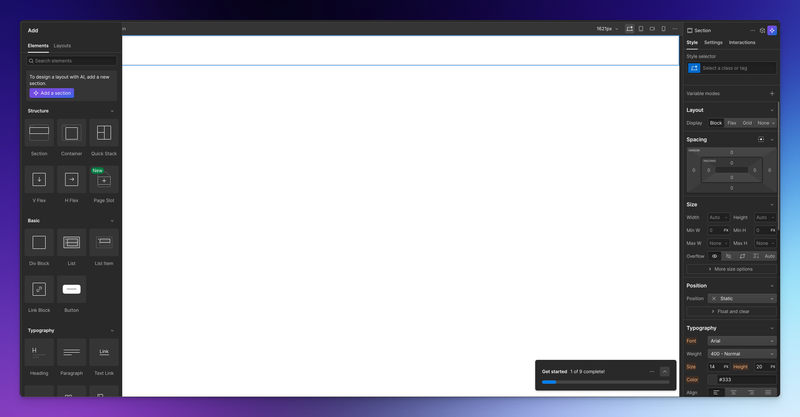
A visual web design tool that generates clean code in the background.
Removes much of the server-side complexity of WordPress, but requires substantial design literacy to use effectively. Think of it as Photoshop that outputs a live website.
Best for: Design-led teams or companies with a dedicated Webflow designer. Not ideal for marketers who need to swap text and launch a campaign page fast.
- Visual canvas with responsive design controls
- Built-in hosting via Webflow's CDN
- CMS collections for structured content
- Significantly lower plugin-conflict risk than WordPress
Pricing: Basic plans start at $14/month. For business-level CMS and hosting, expect $23–$39/month. Team seats and localization features quickly add cost.
Honest Take:
Webflow solves the breakage problem but comes with a learning curve. A marketer with no design background will find Webflow disorienting. It's genuinely excellent for the right profile; that profile isn't most marketing managers at a 20-person SaaS company trying to ship a landing page before the ad campaign goes live.
Framer
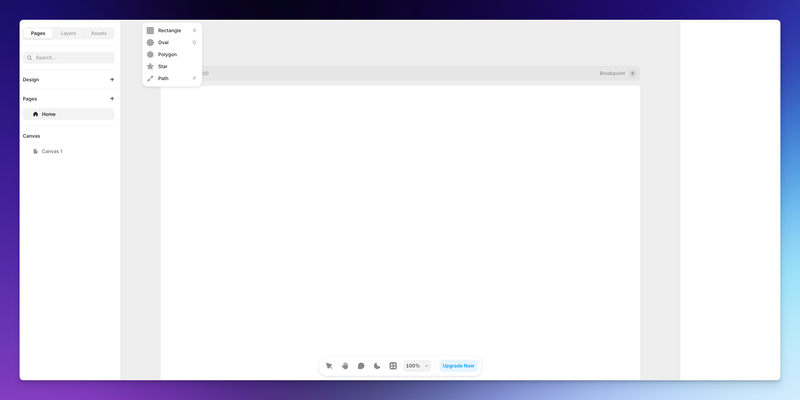
Originally a prototyping tool that evolved into a website builder. Known for smooth animations and modern aesthetics. Growing rapidly in startup circles. The editing experience is more like Figma than a traditional CMS.
Best for: Design-forward startups and product teams building a portfolio or marketing microsites with bespoke visual effects.
- Component-based design with real-time collaboration
- Built-in animation system
- Fast hosting with global CDN
- Localization is available on higher tiers
Pricing: Free tier with Framer branding. Paid plans from $10/month (basic) to $30+/month for team features. Localization and advanced CMS cost more.
Honest Take:
Framer is impressive to look at and painful to edit if you're not the person who built the site.
Content changes often require touching component-level logic that non-designers shouldn't be in.
For marketing teams who need to edit a live site without fear of breaking things, Framer creates its own version of the same problem WordPress faces: it rewards expertise and punishes caution.
HubSpot CMS Hub
HubSpot's website platform is tightly integrated with its CRM, email, and marketing automation tools.
Designed for marketing teams but carries the weight (and cost) of the entire HubSpot ecosystem.
Best for: Companies already invested in HubSpot's CRM and marketing tools who want their website inside the same platform.
- Native integration with HubSpot CRM and marketing automation
- Smart content and personalization features
- Managed hosting and security
- Drag-and-drop page editor
Pricing: HubSpot Content Hub starts at $15/month (Starter), but meaningful features for growing teams begin at $500/month (Professional). Enterprise is $1500/month. Significant jump in cost for scale.
Honest Take:
Excellent if you're already in the HubSpot ecosystem and can justify the cost. For companies looking for a stable CMS with minimal technical risk, HubSpot CMS is overkill and overpriced.
You end up paying for a lot of automation features you may not use to get the website functionality you actually need.
How to Choose the Right CMS for Your Marketing Team
The right tool isn't the one with the most features. It's the one your team can actually use without calling a developer.
Here's a practical decision framework.
Decision Framework
- What's your team's technical level? If no one on your marketing team writes code or manages servers, eliminate any platform that requires it for routine edits.
- Who currently "owns" the site? If it's an external agency, ask how long a simple copy change takes and what it costs. If the answer is 48 hours and an invoice, that's your signal.
- How often do you need to publish? Teams launching multiple campaigns monthly need a CMS with safe, fast self-service. Tools that bottleneck on design approval don't scale.
- Do you operate in multiple languages? Multilingual support is either native, expensive to add, or completely manual. Factor this in before choosing.
- Where is your data stored? For EU-based companies or those serving EU customers, GDPR compliance and EU data residency are non-negotiable. Check this before signing any CMS contract.
- What happens when something breaks? This is the question most teams don't ask until it's too late. Understand the support model, response time, and who is responsible for uptime before you commit.
Final Words
The pattern we see across marketing teams in 2026 is consistent: they're using tools built for developers and wondering why they feel unqualified. They're not unqualified. They're using the wrong tool.
WordPress is not going away. For companies with technical resources, it remains a powerful and legitimate choice.
But for the marketing manager who's been handed the keys to a system they didn't build and can't safely modify, the honest answer is that the platform was never designed for them.
The smarter move is to evaluate what you actually need: the ability to publish content quickly, without breaking things, without waiting on anyone, and without writing a support ticket every time you want to change a headline. That's not a low bar. That's the entire job.
Test any CMS you're considering with a real task: can your least technical team member publish a new landing page in under an hour, without help?
If the answer is no, keep looking. The right tool exists. It may not be the one you inherited.
Turn your CMS into a growth engine – not a blocker
If every new landing page depends on plugins, developers and workarounds, it’s time to rethink your setup. With JET-CMS, marketing teams launch campaigns, multilingual pages and updates in hours instead of days – without plugin chaos or tech stress.

FAQs
WordPress is a composite system: core software, themes, and plugins are all updated independently by different developers. Even if you don't touch anything, a plugin author or your hosting provider may push an update that creates a conflict with another component. This is the core reason behind most WordPress maintenance problems.
Webflow eliminates most plugin-conflict risks because it's a managed platform without a plugin ecosystem. However, it introduces a different kind of technical barrier: the editing interface assumes visual design literacy. For routine content changes, it can be genuinely confusing for marketers who aren't also designers. "Safer from crashes" and "easier for content editors" are not the same thing.
It means the editing interface gives you access only to content fields, text, images, and metadata without exposing layout, code, or structural elements. You can't accidentally delete a section, break a responsive layout, or conflict with a theme file because those layers aren't in your editor. JET-CMS is built on this principle: the design is locked, the content is editable, and the two never interfere with each other.